Reopen a statement for free or extract it again
Last reviewed 16 November 2026 · 5 steps
If you add a PDF you have already converted, open the saved statement for free, or pay to read it again from scratch.
Free account
Steps
Add the PDF as normal
Choose Add statements and add the file. Accounter checks your history for the same file. Only a fingerprint of the file is sent for this check, and a slow answer never stops you converting.
Read the panel
If you have converted the file before, the panel says You've converted this statement before. It shows the client, bank, account and period, and Converted 5 Nov 2026 by you. It also says if the statement balanced and whether it includes your corrections.
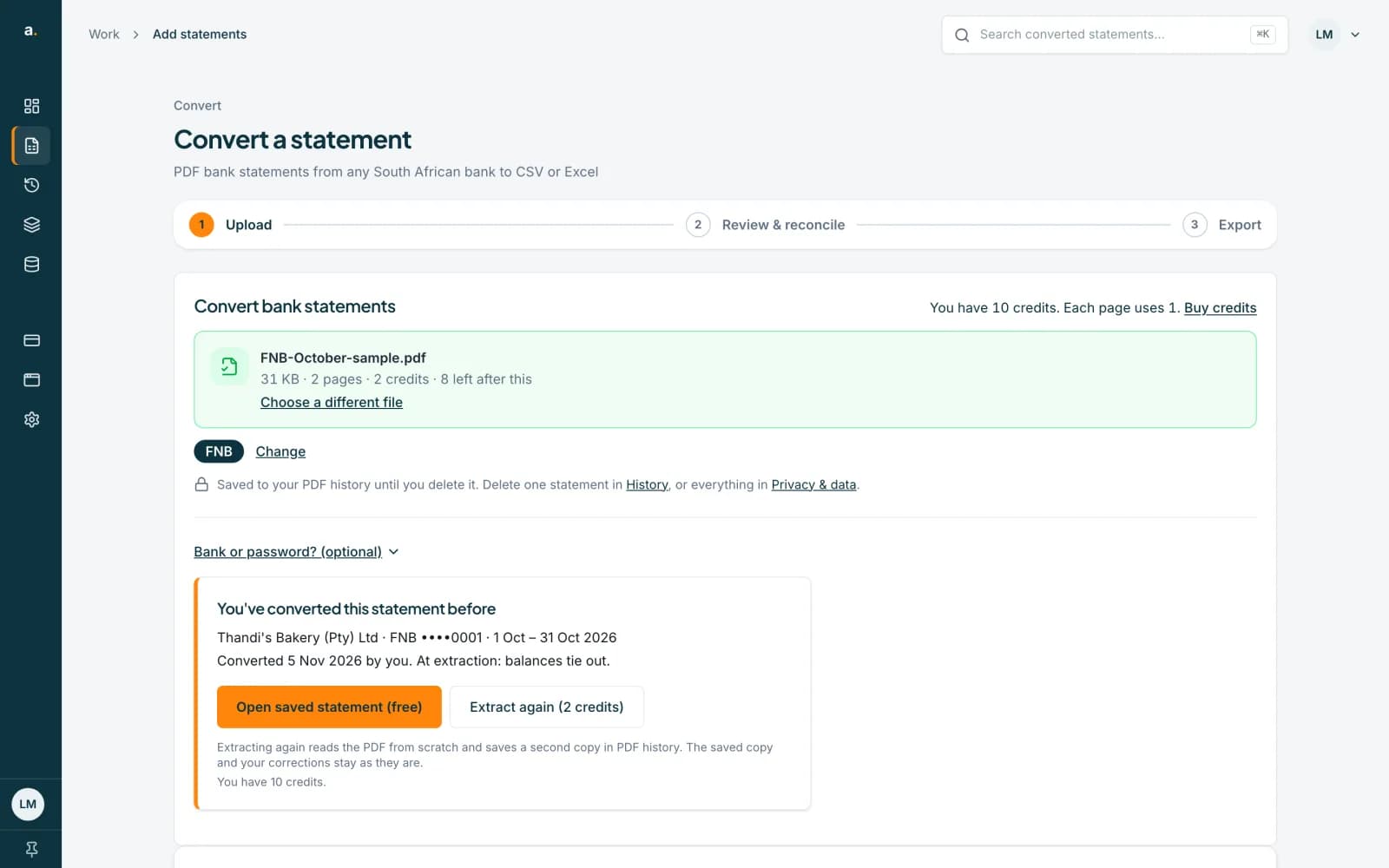 Open full size screenshot for step 2
Press Open saved statement (free)
This opens the saved statement in Statements, with your corrections. It costs nothing, and you can export it again whenever you like.
Or press Extract again
The button shows the price, for example Extract again (2 credits), at 1 credit per page. It reads the PDF from scratch and saves a second copy in your history. The first copy and your corrections stay as they are.
Extract again from Statements
You can also open a statement, choose More, then Extract again. A panel asks Extract this statement again?, shows the price and your balance, and has Extract again and Cancel buttons. It reads the PDF saved in your history, so you do not need the file.
 Open full size screenshot for step 5

Tips
- A list of several files shows the same choice on the row: Converted 5 Nov 2026 by you, with Open saved statement (free) and Extract again. Don't extract again undoes the choice.
- Extract again is charged per page, 1 credit a page, as the price on the button shows.
- Save or discard your edits before you extract again. You will see Save or discard your changes before extracting again if you have unsaved ones.
- A team statement shows who converted it, for example Converted 5 Nov 2026 by Thandi.
If something goes wrong
- You see The original PDF wasn't archived.
- The saved PDF is not there to read again. Upload the file again on Add statements to extract it. See the guide on statements without an original PDF.
- You see The saved PDF is no longer available.
- Upload the file again to extract it.
- The panel asks for a password.
- The statement is locked. Enter its password to extract it again. A wrong password uses no credits.
- You see This statement is already being extracted again.
- Nothing new was charged. Wait for the first run to finish.
Related guides
- Convert a bank statement PDF to CSVUpload a bank statement PDF, check the balance and download a CSV you can open in Excel.
- What to do when the original PDF is not archivedSome statements are saved without their PDF. You can still edit and export them, and you can upload the file again to read it afresh.
- Edit a statement and save correctionsFix a row that was read wrongly, add a missing row or delete an extra one, then save so your downloads include the changes.